Thermometer For Room Temp
Micro IncWeather
4.1105.00 Reviews
- Version
- 1.26.52
- Installs
- 500.00K
- Age Rating
- Everyone
Screenshots
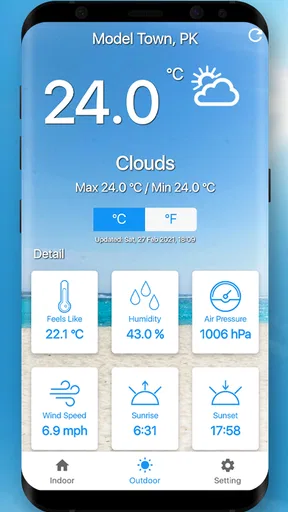
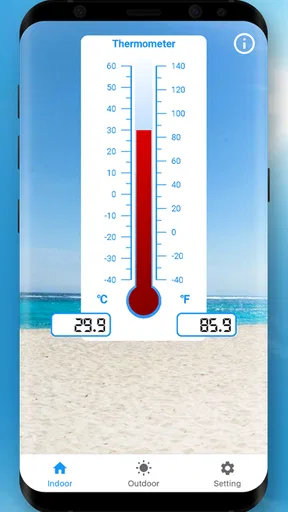
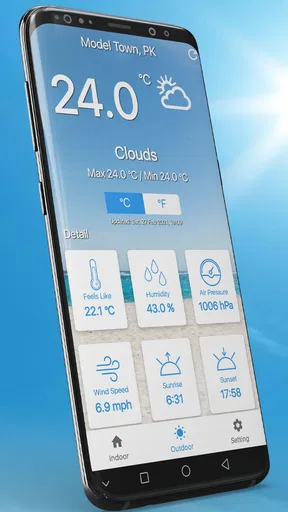
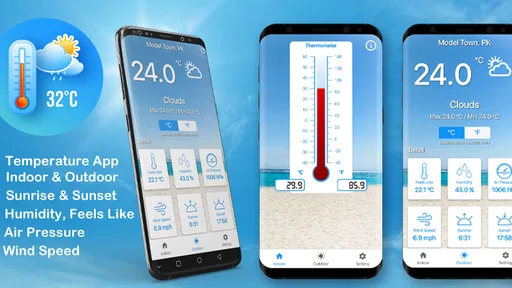
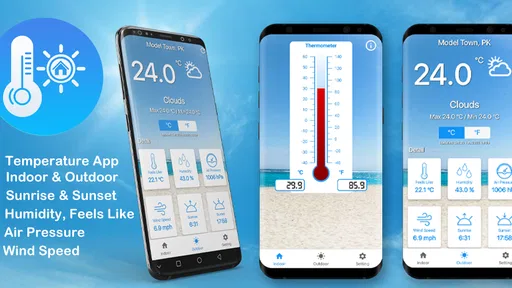
Our Review of Thermometer For Room Temp
 Analysis by Appyee
If you want a quick way to check how warm a room feels, Thermometer For Room Temp is a straightforward weather app from Micro Inc that focuses on indoor temperature readings. I approached it as a first-time user would: install it, look for a useful reading, and decide whether it can replace the small thermometer I might otherwise keep on a desk. The experience is simple, but the important question is how much confidence you should place in a phone-based result.
The app is free to install and is rated for Everyone, which makes it easy to try without committing money at the start. It has passed half a million installs and holds an average rating of 4.1 from roughly 3.9 thousand ratings, so it has attracted a noticeable audience without being presented as a specialist instrument. That positioning matters. I see it as a convenient reference for everyday comfort, not as equipment for medical, laboratory, food-safety, or heating-system decisions.
What to expect before your first reading
The store summary describes a room-temperature meter and indoor heat sensor, while the short description simply calls it a thermometer. In practice, that sets a useful expectation: this is designed to give you a temperature-oriented view of your surroundings rather than a full weather service with a large forecast dashboard. If your main need is to know whether a bedroom, office, or living area feels unusually warm, that narrow purpose can be an advantage.
I would not install it expecting the same authority as a dedicated digital thermometer. A phone can estimate its surroundings only under suitable conditions, and the phone itself produces heat. A device that has been charging, sitting in direct sunlight, or working hard may influence the result. The number can therefore be useful as a quick indication while still being imperfect as a precise measurement.
This distinction is especially important for parents checking a nursery, anyone adjusting a heater, or a person comparing rooms. For those situations, I would treat the app as a first check and confirm important decisions with a physical thermometer. That is not a flaw unique to this app; it is the basic trade-off of using a smartphone instead of a purpose-built sensor.
The current version is 1.26.48, and the app supports devices running Android 6.0 or later. Those details make it accessible to many older phones, although compatibility alone does not guarantee identical results across different hardware. Sensors, casing, battery condition, and recent phone activity can all affect how convincing a reading feels.
Who will get the most from it
I think this app suits people who want a fast, low-effort reference while moving around the home. A renter checking whether a room is warmer than expected, a remote worker deciding whether to open a window, or someone comparing a shaded room with a sunny one can benefit from having a simple tool close at hand. It is also useful for a first look when you do not already own an indoor thermometer.
The best use is comparative rather than absolute. If the app shows a change after you turn on a heater or move from one room to another, that change may help you understand the space. To make that comparison fair, keep the phone in the same case, away from your hand, and give it time in each location. Repeating the check under similar conditions is more informative than trusting one instant reading.
I would skip it if you need certified accuracy, continuous monitoring, alerts, a remote sensor, or a detailed record of temperature over time. A dedicated indoor thermometer is a better choice for those jobs. A standard weather app is also better if your real goal is outdoor conditions, rain timing, wind, or a multi-day forecast. This app’s appeal is its directness, not its breadth.
Installing it without overthinking the process
Because it is free, the first step is relatively painless: install it on a compatible Android phone and open it in the room you want to check. I recommend starting in a normal indoor location rather than beside a radiator, air-conditioning outlet, window, or running computer. Those spots create local conditions that may not represent the room as a whole.
Before interpreting anything, let the phone rest. Put it on a table or another stable surface rather than holding it tightly. Your hand adds warmth, and movement makes it harder to tell whether the reading is settling. I also avoid checking immediately after gaming, charging, using the camera, or running another demanding task. The first reading is best treated as a starting point, not a verdict.
The app is free, but in-app purchases range from $1.99 to $12.99 per item. I would begin with the basic experience and decide later whether any optional purchase genuinely improves your routine. A temperature check should not require spending money for someone who only wants an occasional indication, so there is no reason to rush into a purchase before understanding how the app behaves on your phone.
One practical habit is to choose a reference location in your home. For example, use the center of a desk in the living room and check there at similar times. This gives you a personal baseline. Without a consistent location, differences caused by sunlight, furniture, airflow, or phone heat can look like meaningful changes when they are really changes in the measuring conditions.
Getting to the first useful result
The first successful action is not simply opening the app; it is obtaining a reading you can sensibly compare with your surroundings. I would place the phone on a clear surface, wait for the display to settle, and then note whether the result matches the obvious feel of the room. If the room feels cool and the reading suggests warmth, repeat the check after the phone has rested longer rather than immediately assuming the room is unusual.
For a more useful test, take two readings in the same room several minutes apart without moving the phone. Then move to another room and repeat the process. This small routine can reveal whether the app is responding consistently or whether the phone is still carrying heat from earlier use. It also turns a vague number into a practical comparison: which room is warmer, and by roughly how much?
A realistic example would be working from home on a winter morning. I might leave the phone on my desk before turning on a heater, take a settled reading, and check again after the room has had time to warm. If the result changes in the same direction as the room’s comfort, the app has done its job as a convenient guide. I would still avoid using that reading to decide whether a child is feverish or whether food has been stored safely.
Another useful workflow is checking a room before changing the thermostat. Instead of repeatedly holding the phone in different places, I would use one fixed surface and compare the result after each adjustment. This reduces noise and prevents the common mistake of confusing body heat or a warm pocket near a vent with the general temperature of the room.
Common confusion about phone-based temperature checks
The biggest source of confusion is assuming that every phone has the same ability to measure room temperature. The app may work differently depending on the device and its available hardware. Even when a phone can produce a temperature-related result, the internal components are not automatically the same as a dedicated ambient sensor placed in the room.
That is why one reading should not be treated as exact simply because it is displayed neatly. A phone that has just been in a pocket, under a blanket, or in direct sun is not in a neutral condition. I get better results by removing those influences, placing the device somewhere open, and waiting before making a comparison.
Users may also confuse indoor temperature with outdoor weather. The app’s purpose is room-focused, so it is not the tool I would choose for deciding whether to carry an umbrella or how cold it will be later. For those questions, a conventional weather app that uses local forecast information is more appropriate. Here, the useful question is what the nearby indoor environment feels like, not what is happening across town.
Another point worth understanding is that comfort is personal. Two people can react differently to the same room, and humidity, clothing, airflow, and activity affect how warm a space feels. A temperature reading can explain part of the experience, but it cannot replace your own judgement about whether the room is comfortable.
I would also avoid placing too much meaning on tiny changes. Moving the phone a short distance, touching it, or checking beside a window can alter the result. The app is most helpful when you look for a clear pattern rather than reacting to every small fluctuation. This is one of the less obvious lessons of using it: consistency in the test matters almost as much as the app itself.
How it compares with the usual alternatives
Compared with a physical indoor thermometer, this app wins on convenience. Your phone is already with you, there is no separate object to mount, and the free entry point makes it easy to experiment. The physical thermometer wins on purpose-built measurement, stable placement, and confidence when the number matters. I would use the app for a quick check and the dedicated device for decisions where accuracy has consequences.
Compared with a general weather app, it has a narrower focus. A weather app normally helps with outdoor forecasts and changing conditions, while this one is aimed at the room around you. If you only want an indoor reference, a large forecast interface can feel excessive. If you need both indoor and outdoor information, however, this app will not replace the broader weather tool.
Compared with a smart-home sensor, the app is simpler and less demanding. A separate sensor can remain in one place and may support longer-term monitoring, whereas a phone-based check requires you to bring the device to the location. The trade-off is cost and setup: the app is easier to try, while a sensor is better for automation, remote checks, or a room that needs constant observation.
There is also a privacy and practicality angle in choosing a phone app, although I would still review the app’s own permission prompts and purchase screens carefully during setup. I prefer not to buy anything until I know the basic reading is useful on my particular device. That approach keeps the trial low-risk and makes it easier to judge the app on performance rather than on its optional extras.
Small habits that improve the experience
My first tip is to create a repeatable measuring routine: same room, same surface, similar distance from heat sources, and a short rest period before reading. This is more valuable than searching for a single “perfect” number. It gives you a personal reference that can reveal genuine changes, such as a room cooling overnight or warming after ventilation.
My second tip is to separate phone temperature from room temperature. If the device feels warm, do not use that moment as your baseline. Let it cool naturally, avoid covering it, and check again. This simple step is easy to overlook because the app itself may open normally even when the hardware is not in a neutral state.
My third tip is to use the app for decisions that are reversible. Opening a door, moving to another room, or adjusting a heater slightly are reasonable experiments. Medical, safety, and preservation decisions are not. For those, I would use the appropriate dedicated instrument and regard the app only as an informal extra reference.
A fourth useful approach is to compare trends at the same time of day. A morning reading and an afternoon reading taken from different locations do not tell you much. Repeating the same routine makes the result easier to interpret and helps you notice whether a change is caused by the room or by the way you handled the phone.
Where the app feels limited
The main limitation is confidence. A clean interface can make a measurement feel more authoritative than the conditions justify. The app is convenient, but convenience is not the same as precision. Anyone who needs dependable ambient readings should plan to verify important results with a physical thermometer.
The narrow purpose may also feel restrictive to people expecting a complete weather companion. I would not choose it as my only weather app because its value is tied to indoor checks. Likewise, users wanting automatic history, remote monitoring, or a sensor that stays in a room may quickly outgrow a phone-centered approach.
There is a practical limitation in repeated checking too. You need to place and rest the phone each time, so it is less effortless than glancing at a wall-mounted thermometer. If you are checking several rooms frequently, carrying the phone around becomes part of the task. That is acceptable for occasional use, but it is not the most efficient setup for constant monitoring.
The optional purchase range is another reason I would judge the free experience first. The app costs nothing to start, but paid items can become relevant depending on what you want from it. I prefer a clear personal rule: use the basic tool long enough to confirm that readings are consistent and useful before considering any upgrade.
My recommendation for a first-time user
I would recommend trying Thermometer For Room Temp if you want a simple indoor temperature reference and already understand its limits. Install it, place the phone on a neutral surface, wait for it to settle, and compare the result with the room rather than treating it as laboratory equipment. That path gives you a meaningful first success without making the setup more complicated than it needs to be.
For a first test, choose a quiet room with no direct sunlight or strong airflow. Take one reading, wait, and take another without touching the phone. Then repeat the check in a second room. If the results behave sensibly and help you make everyday comfort decisions, the app has earned a place in your toolkit.
If the readings seem surprising, do not immediately blame the room or purchase an alternative inside the app. First repeat the test after the phone has cooled and under more consistent conditions. If confidence remains low, a basic physical thermometer is the better next step. That is a sensible outcome, not a failure: the app is meant to make a quick check accessible, not eliminate the need for every other measuring tool.
Micro Inc has kept this weather app approachable, and its broad age rating reinforces that it is easy to try for ordinary household use. With a 4.1 average and more than 500 thousand installs, it has enough adoption to be worth considering, while its limitations are clear once you think about how phones measure their surroundings.
My final view is positive but measured. I like it as a convenient indoor reference, especially for comparing rooms or checking whether a heating change made a noticeable difference. I would not rely on it for health, safety, or precision work, and I would choose a standard forecast app or a dedicated sensor when those are the real needs. Use it as a practical first check, keep your measuring routine consistent, and verify important readings with the right instrument.
Privacy and Permissions
See what permissions an app requests and how it handles your data.
- Location
- approximate location (network-based), precise location (GPS and network-based)
- Other
- view network connections, full network access, run at startup, prevent device from sleeping
Verdict
Strengths of Thermometer For Room Temp
- Simple interface makes temperature readings easy to understand.
- Useful for checking room comfort before sleeping or working.
- Supports quick checks without complicated setup.
- Lightweight app with minimal storage requirements.
- Helpful for comparing temperature changes between rooms.
Limitations of Thermometer For Room Temp
- Accuracy depends heavily on your phone’s available sensors.
- Some devices may not support indoor temperature measurement.
- Readings can be affected by heat from the phone itself.
- May display estimates rather than professionally calibrated results.
- Ads or extra features may reduce the overall user experience.
Similar Picks in This Category
View All
Weather - By Xiaomi
Xiaomi Inc.4.1

Weather & Radar Forecast
WetterOnline4.8

Weather
OneLouder Apps4.6

AccuWeather: Weather Radar
AccuWeather3.6

The Weather Channel - Radar
The Weather Channel4.6

1Weather Forecasts & Radar
OneLouder Apps4.3
Frequently Asked Questions
What is Thermometer For Room Temp used for?
Thermometer For Room Temp is designed to provide an estimate of the surrounding room temperature using your mobile device. It can be useful for checking general indoor comfort at home, in an office, or while traveling. The app is intended for casual reference rather than professional environmental monitoring, medical use, or situations that require highly precise temperature measurements.
Does Thermometer For Room Temp require a special sensor or additional equipment?
The app generally works with the sensors available on your smartphone, depending on the device model and operating system. Some phones do not include a dedicated ambient-temperature sensor, so the application may estimate room conditions using battery, device, location, or weather-related data. For the most reliable results, keep the phone away from direct sunlight, chargers, cases that retain heat, and other warm surfaces.
How accurate are the temperature readings in Thermometer For Room Temp?
The accuracy can vary considerably between devices and environments. A phone may become warmer while charging, gaming, or running multiple applications, which can affect the displayed value. In our experience, the app is best treated as a convenient approximation of room temperature. If you need dependable measurements for laboratories, storage, heating systems, or safety purposes, use a calibrated digital thermometer instead.
Why does the app request location or other permissions?
Depending on the version and features available, Thermometer For Room Temp may request permissions such as location access to obtain local weather information or improve its environmental estimate. These permissions are not necessarily required for every function. Before accepting, review the permission description and your device settings. If a permission seems unrelated to the app’s purpose, you can deny it and check whether the core temperature feature still works.
Can Thermometer For Room Temp measure body temperature or diagnose illness?
No. Thermometer For Room Temp is intended to estimate the temperature of the surrounding environment, not to measure human body temperature. A smartphone application should not be used to diagnose fever, monitor a medical condition, or replace a clinical thermometer. If you are concerned about your health, use an appropriate medical thermometer according to its instructions and contact a qualified healthcare professional when necessary.
